Overview
The DualShock 4 controller is Sony's first significant redesign since the DualShock launched in 1997 as an updated controller for the original PlayStation. Sticking with the overall basic form factor, the DualShock 4 is a slightly larger, more ergonomic iteration on its predecessor. New features include a textured underside to improve grip, reshaped L2 and R2 buttons that better resemble analog triggers, reshaped left and right analog sticks that are concave on the top, a capacitive touch pad located where the start and select buttons were in previous versions, an built-in mono speaker, a headset jack, and a Move-styled, multi-color light bar. It has a built-in 3.65V Lithium-ion rechargeable battery with 1000mAh capacity.
Input
- Two analog sticks (Improved fidelity and materials over the DualShock 3)
- Pressure sensitive, four button D-pad
- Traditional Δ, ☐, O, X face buttons
- Two analog shoulder buttons (L1, R1)
- Two analog triggers (L2, R2)
- Face mounted 3-point clickable capacitive touch pad
- Two digital face buttons (Share, Options)
- Six-axis motion sensing (newly built high precision sensors)
- Headset jack (mono headset will be bundled with PS4)
Output
The DualShock 4 has an in-built mono speaker "to deliver high-fidelity sound effects" from the controller and a 3 color LED light bar similar to the orb found in the PlayStation Move.
LED Light Bar
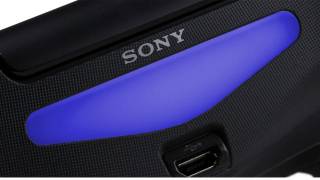 Dualshock 4 Light Bar - Colored Blue
The top mounted color light bar on the DualShock 4 can identify different controllers during local multiplayer sessions and change color dynamically to provide useful information to players, such as glowing red to indicate they've taken damage.
The DualShock 4 also works alongside the PlayStation Camera, another peripheral which can "sense the depth of the environment in front of it and also track the 3D location of the controller via its light bar."
Connectivity
The DualShock 4 utilizes Bluetooth 2.1+EDR to communicate with the PlayStation 4. It also has a Micro-USB (Micro-B) port to communicate and charge.
Compatibility
Aside from being the primary interface device for the Playstation 4, the DualShock 4 is additionally compatible with the Playstation 3, Windows PCs, and Mac OSX. The compatibility is limited to basic plug-and-play functions as a generic wired controller via a standard Micro-USB cable or via bluetooth. The touch pad, motion sensors, and built-in speaker functions are not currently accessible.
Additional compatibility can be added to the device on Windows PCs by utilizing XInput mappers such as DS4Windows which make the controller compatible with games that can only utilize the XInput standard as well as add additional functionality such as touchpad to mouse support and various lightbar configuration options.
Log in to comment